
Wi-Fi
The RG35XX SP has 2.4 and 5 GHz Wi-Fi. Tetsu OS uses it for network time, box art, cheats, RetroAchievements, WI-FI TRANSFER, SAVE BACKUP and system updates.
Joining a network
Open Settings > WI-FI. Networks in range are listed by signal strength, with saved ones out of range at the end. Choose one with A and type its password on the keyboard. A network is saved once it connects, and joined again by itself from then on.
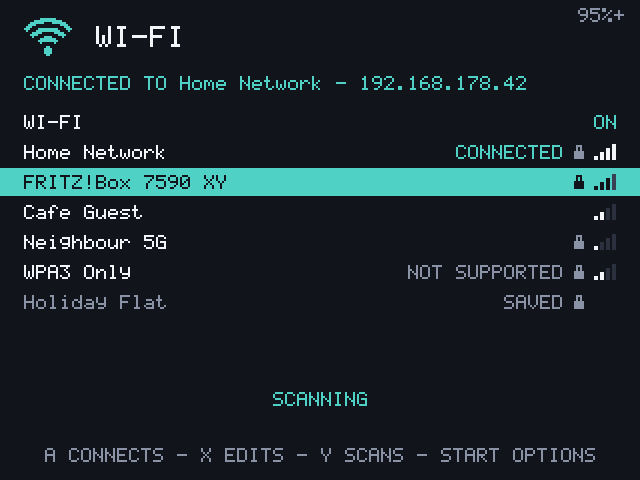
WPA3-only, enterprise (802.1X) and WEP networks show as NOT SUPPORTED.
| Button | What it does |
|---|---|
| A | Join a network, or open the connected one's page |
| X | Open a saved network's page |
| Y | Search again (it also searches every 10 seconds) |
| Start | WI-FI OPTIONS |
The first row turns Wi-Fi ON or OFF. Off saves battery and is kept after a restart.
A network's page
X on a saved network opens its settings:
- CONNECTION DETAILS: address, gateway, DNS, MAC address, signal, band, channel and speed
- IP ADDRESS: AUTOMATIC, or MANUAL with your own ADDRESS (such as
192.168.1.50/24) and GATEWAY - DNS: up to three servers, or empty for the router's
- AUTO-JOIN: off to join this network only when you choose it
- MAC ADDRESS: DEVICE, or PRIVATE for a made-up address for this network
- FORGET: A twice
Wi-Fi options
Start on the Wi-Fi screen opens WI-FI OPTIONS:
- HOSTNAME: the device's name on the network,
tetsu-rg35xxspby default. The device also answers to<hostname>.local. - COUNTRY: sets which channels and power levels are allowed. AUTOMATIC follows the router.
- POWER SAVING: on saves battery; off can make the connection more responsive.
- ADD A HIDDEN NETWORK: type its name, then its password (empty for an open network).
Time
Once connected, the clock is set from the internet and kept in the device's clock for the next start. Set your TIME ZONE and CLOCK (24 HOUR, 12 HOUR or OFF) in Settings > GENERAL. Without Wi-Fi, set it with SET TIME.
Sleep and Wi-Fi
Closing the lid disconnects from Wi-Fi, and opening it reconnects within a few seconds.