Bluetooth
Bluetooth is off by default. Turn it on in Settings > BLUETOOTH; the screen searches for devices while it is open.
Pairing
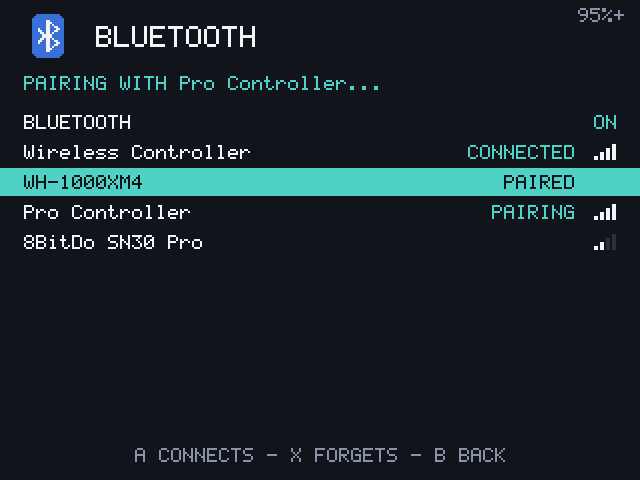
Put the controller or headphones in pairing mode, then choose them in the list with A. They are paired, trusted and connected, and reconnect by themselves from then on.
| Button | What it does |
|---|---|
| A | Pair a new device, or connect and disconnect a paired one |
| X twice | Forget a paired device |
Connected devices are listed first, then paired ones, then the rest by signal. Devices that never say their name are left out.
Controllers
A controller acts as the device's own buttons, in the menus and in games, with its D-pad and left stick as the D-pad. The kernel has drivers for PlayStation, Nintendo, Xbox and other common controllers, with their vibration.
Checked with: a Backbone Pro. Other controllers, such as a DualShock 4, should work but haven't been tried yet.
Headphones
Connected Bluetooth headphones take over the sound of games and menus, and the sound moves back to the speaker when they disconnect, and over again when they return. The volume buttons change the headphones' volume. The boot jingle always plays on the speaker.
Checked with: a Bose QC35 II. Every headset works with the SBC codec, the only one in the image. Expect a short gap in sound when the headphones connect during a game, and some delay, as with any Bluetooth audio.
Good to know
- Pairings survive restarts and updates, but not writing a new image to the card.
- Bluetooth shares its chip with Wi-Fi. Wi-Fi's deepest power saving is off to keep the connection stable.
- USB controllers don't work: the USB port works as a device only, not as a host.