
Settings reference
Start opens Settings from anywhere in the menus. Settings is a grid of groups: A opens a group, B goes back, and Start closes Settings. Settings that can't be undone need A twice.
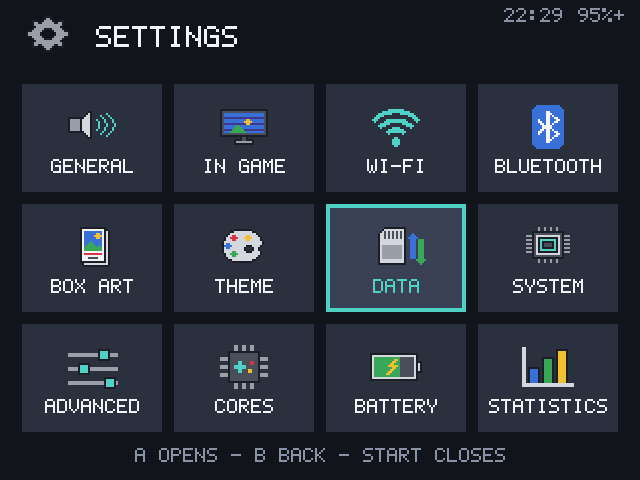
GENERAL
| Setting | Choices |
|---|---|
| VOLUME | 0 to 100% in steps of 5 |
| BRIGHTNESS | The screen's backlight |
| LANGUAGE | ENGLISH or DEUTSCH, applied at once |
| MENU SOUNDS | OFF (default) or ON |
| BOOT JINGLE | ON (default) or OFF. Off starts 2.6 seconds sooner |
| TIME ZONE | 58 cities, west to east |
| CLOCK | 24 HOUR, 12 HOUR or OFF |
| SET TIME | Set the date and time by hand, for use without Wi-Fi |
IN GAME
| Setting | Choices |
|---|---|
| DISPLAY | Default SCALING, SCREEN EFFECT, LCD GHOSTING and BORDER for consoles you haven't set in a game. USE FOR ALL CONSOLES resets every console to these |
| VIBRATION | The motor's strength, or off |
| GAME SWITCHER | LIST or COVERS |
| ACHIEVEMENTS | On or off for every game, ACCOUNT, HARDCORE, and where UNLOCKS, PROGRESS and OTHER MESSAGES show. See RetroAchievements |
WI-FI and BLUETOOTH
Their own screens. See Wi-Fi and Bluetooth.
BOX ART
| Setting | What it does |
|---|---|
| DOWNLOAD MISSING COVERS | Fetch covers for games without one |
| DOWNLOAD ALL COVERS AGAIN | Replace every cover |
| DELETE ALL COVERS | A twice |
| COVERS IN LISTS | ON or OFF |
| SCREENSHOTS AS COVERS | ON (default): a game without a cover shows its newest screenshot |
THEME
COLOR, BACKGROUND, TITLE, TITLE TEXT, GRID SIZE, HOME SCREEN TILES, START SCREEN, GAME NAMES and SORT GAMES BY. See Making it yours.
DATA
| Setting | What it does |
|---|---|
| USB STORAGE | Show TETSU-DATA (and a TF2 card) to a computer as a drive |
| WI-FI TRANSFER | A web page for games, covers, saves and backups |
| SAVE BACKUP | Back up saves with Syncthing. See Save backup |
| COLLECTIONS | Rename (A) or delete (X twice) your collections |
| HIDDEN GAMES | Show hidden games again (A) |
SYSTEM
| Setting | What it does |
|---|---|
| SYSTEM INFO | Battery, storage, game count, memory with the RAM type, CPU, network addresses, uptime, kernel, build and version. X saves logs to the card |
| BUTTON TEST | Shows each button as it is pressed |
| SLEEP WHEN IDLE | OFF (default), 2, 5, 10 or 30 minutes in the menus |
| POWER OFF AFTER SLEEP | 1, 2 (default), 4 or 8 HOURS or NEVER, on battery |
| SYSTEM UPDATE | See Upgrading |
| REBOOT / POWER OFF | A twice |
ADVANCED
| Setting | Choices |
|---|---|
| SSH | OFF (default on a release), USB ONLY (default on a development build) or USB + WI-FI. On a release, turning it on makes a root password first; on a development build only USB + WI-FI needs a root password or an SSH key |
| ROOT PASSWORD | Type one, or R1 for a random one. Start on an empty field removes it |
| SSH KEYS | How many are set. A twice removes them all |
| PERFORMANCE | BATTERY, BALANCED (default) or PERFORMANCE |
| BOOT MESSAGES | LOGO (default) or TEXT, to see the kernel's messages while starting |
| RUN SETUP AGAIN | The setup from a new install |
| RESET SETTINGS | A twice. Back to defaults, except volume, brightness and language. Games, saves, covers, Wi-Fi networks, the root password and keys stay |
CORES
Each console's emulator options, as in the in-game menu's CORE OPTIONS. See Core options.
BATTERY
| Setting | Choices |
|---|---|
| CHARGE HISTORY | The level over 24 hours or 7 days |
| HEALTH AND USE | Capacity, cycles, and drain per console |
| SHOW IN CORNER | PERCENT, TIME LEFT, WHEN LOW or HIDDEN |
| LOW BATTERY AT | 5, 10, 15 (default) or 20% |
| CHARGED NOTICE | ON (default) or OFF |
| CHARGE TO | FULL, ABOUT 85% or ABOUT 70% |
STATISTICS
Play time per week and per console. See Play statistics.