
Upgrading
There are two ways to move to a newer Tetsu OS: SYSTEM UPDATE on the device, or writing a new image to the card. Both keep your games, saves and settings.
SYSTEM UPDATE
Settings > SYSTEM > SYSTEM UPDATE downloads and installs a new system over Wi-Fi.
- Connect to Wi-Fi and charge the battery above 30%, or plug in the cable.
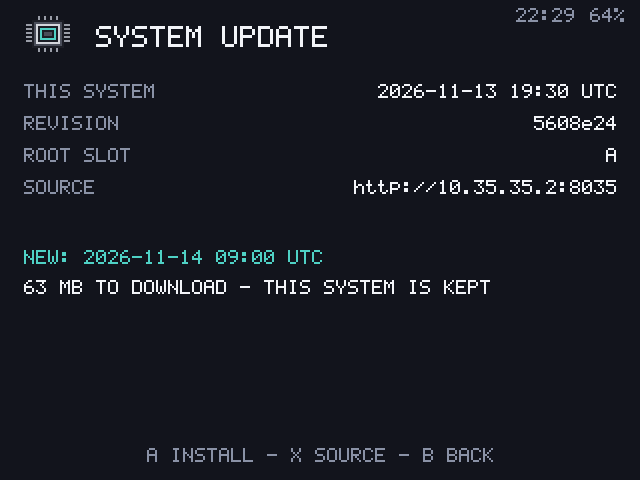
- Press A to look for an update. The screen shows the running build and what it found.
- Press A again to install. A bar shows the download, then a check of what was written. It takes about two minutes.
- Press A to restart into the new system, or B to switch over at the next start.
B twice stops an install, and closing the lid only turns the screen off.
Where updates come from
The screen's SOURCE row shows where the device looks for updates. Press X to type another, such as a folder on your own web server. For official releases the source is:
https://github.com/iDentitY4/TetsuOS/releases/latest/downloadEvery update is signed. The device installs only updates signed by the project, made for this device, and newer than the running system, whatever the source.
How it stays safe
The card has two system slots, A and B. An update is written into the slot that isn't running, and checked byte for byte, while the running system stays as it was.
The bootloader then tries the new slot. If it doesn't reach the launcher in 3 tries, the device goes back to the old slot by itself, and SYSTEM UPDATE says <build> DID NOT START, THIS SYSTEM WAS KEPT. A power cut during an install leaves the running system untouched.
Cards from before 2026-11-13
SYSTEM UPDATE needs the bootloader from 2026-11-13 or later. On an older card it says THIS CARD NEEDS ONE FLASH FOR UPDATES: write a new image once, as below.
SYSTEM UPDATE doesn't update the bootloader itself. When a release notes a bootloader change, write the new image to the card.
Writing a new image
Write the new card image as in Installation, with an image writer or scripts/flash.sh (without --format-data). TETSU-DATA is kept with everything on it: it starts past the end of the image, so the image never reaches it, and the partition table entry that writing the image removes is added back, by flash.sh or by the device at its next start.
Writing an image resets:
- the system to slot A
- Bluetooth pairings
- BOOT MESSAGES (back to the logo)
It keeps games, saves, settings, Wi-Fi networks, the root password and SSH keys, which live on TETSU-DATA.
Release notes
Each release on the Releases page lists what changed. The running build is in Settings > SYSTEM > SYSTEM INFO.